
BuildBox container
BuildBox runs in Docker container to isolate build environment from host system. This container runs privilegied.
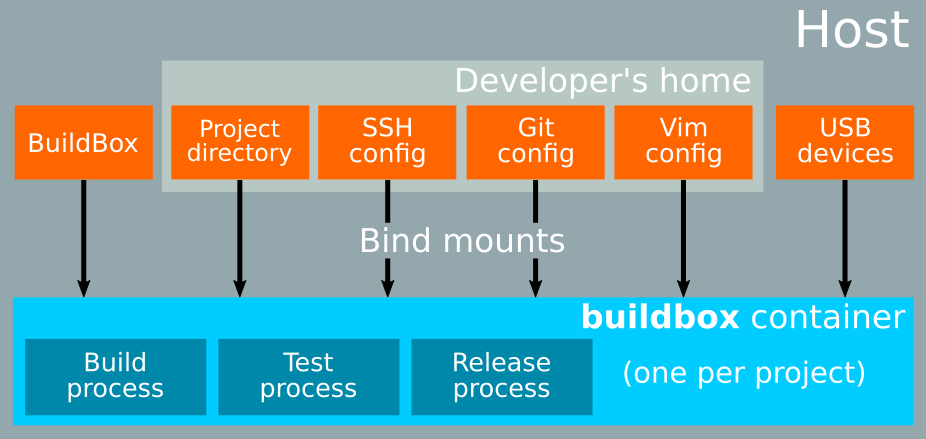
The container is dedicated to a single project: one project, one container. The container is named bbx-<project_basename>-<hash> where <hash> is derived from the project root path, ensuring unicity per project location.
The project directory is mounted into the container at the same absolute path. BuildBox sources are also mounted into the container, so they can be updated without recreating the container.
The BuildBox user UID and GID are mapped on host user identifiers.
Required build files are located in the docker directory:
- Dockerfile,
bin/bbx: BuildBox host-side launcher, used to manage the container and run commands,entrypoint.sh: container entry point, to map UID / GID from host user.
Dockerfile
The Dockerfile builds the base image starting from a Debian 12 slim base.
It installs the common build toolchain (gcc, autotools, cmake, python3, git, …) and the BuildBox runtime (user, sudo rules, udev, entrypoint).
A Dockerfile.docker variant extends the base image to add a full Docker installation inside the container (see Docker variant image).
Build new image
Base image
Every time Dockerfile is updated, a new base image has to be built.
From BuildBox sources docker/ directory, run:
docker build --network="host" --no-cache --pull -t buildbox .It creates a buildbox:latest image. Tag it with the BuildBox version:
docker tag buildbox:latest buildbox:M.m.rThe tag M.m.r should follow the BuildBox release tag.
To start testing your changes with the newly created local image, stop any running project container using bbx stop, then run bbx from the project directory, it will pick up the new image.
Once everything is right, the local image can be pushed remotely to be used by BuildBox users. By convention, the BuildBox sources commit used to build the image is tagged docker_M.m.r.
Docker variant image
The Docker variant image (Dockerfile.docker) extends the base image with a full Docker installation (Docker Engine, Buildx, Compose, rootless extras). Its purpose is to allow building Docker images from within a BuildBox container, which is required by projects that orchestrate Docker builds as part of their build process.
The base image must be built and tagged before building this variant.
From BuildBox sources docker/ directory, run:
docker build --network="host" --no-cache -t buildbox-docker -f Dockerfile.docker .Tag it with the same version as the base image:
docker tag buildbox-docker:latest buildbox-docker:M.m.rTo push to a registry:
docker push buildbox-docker:M.m.rProjects that need Docker-in-Docker declare this image in their .bbx/image file, or use a derived image that starts FROM buildbox-docker:M.m.r.
Custom images
A project may use a custom Docker image instead of the official BuildBox image. This is the recommended way to add project-specific tools, libraries, or configurations that are not part of the standard BuildBox image.
Creating a custom image
Custom images are built with a standard Dockerfile that starts FROM the official BuildBox image:
FROM buildbox:latest

# Example: install a project-specific toolchain
RUN apt-get update && apt-get install -y --no-install-recommends \
    gcc-arm-none-eabi \
    binutils-arm-none-eabi \
    && rm -rf /var/lib/apt/lists/*

# Example: install Python packages
RUN pip install --break-system-packages pyserial==3.5

# Example: add custom configuration
COPY my-tool.conf /etc/my-tool.conf
Build and tag the image:
docker build -t mycompany/buildbox-custom:latest path/to/my-dockerfile/
docker tag mycompany/buildbox-custom:latest mycompany/buildbox-custom:2.1.0
To push to a private registry:
docker push mycompany/buildbox-custom:latestTo declare a custom image for a project, see Custom Docker image.
Container recreation
When .bbx/image changes (or is added/removed), the next bbx command automatically stops the existing container and starts a new one using the updated image. No manual bbx stop is required.
TTY USB devices
To deal with USB TTY devices from BuildBox container, there are two involved mechanisms:
- udev, to trigger events,
- buildbox_tty_usb_sync tool, located in BuildBox sources
docker/bindirectory.
This last tool is responsible of devices nodes synchronization between host and BuildBox container. It is triggered by host-side udev rules (see TTY USB devices settings).
Logs are written to syslog. Assuming your system logs are readable through journalctl, you can read them with:
journalctl -f -g "Buildbox USB TTY sync"and you can see lines line this when a device is plugged:
oct. 09 17:56:29 darkknight buildbox_tty_usb_sync[2346574]: Buildbox USB TTY sync: added /dev/bus/usb/001/120 (189:119)
oct. 09 17:56:30 darkknight buildbox_tty_usb_sync[2346574]: Buildbox USB TTY sync: added /dev/ttyUSB0 (188:0)
and like this when a device is removed:
oct. 09 17:56:33 darkknight buildbox_tty_usb_sync[2346823]: Buildbox USB TTY sync: removed /dev/bus/usb/001/120
oct. 09 17:56:33 darkknight buildbox_tty_usb_sync[2346823]: Buildbox USB TTY sync: removed /dev/ttyUSB0